
Node.js Runs on One Thread. Here Is How It Handles Thousands of Users Anyway.
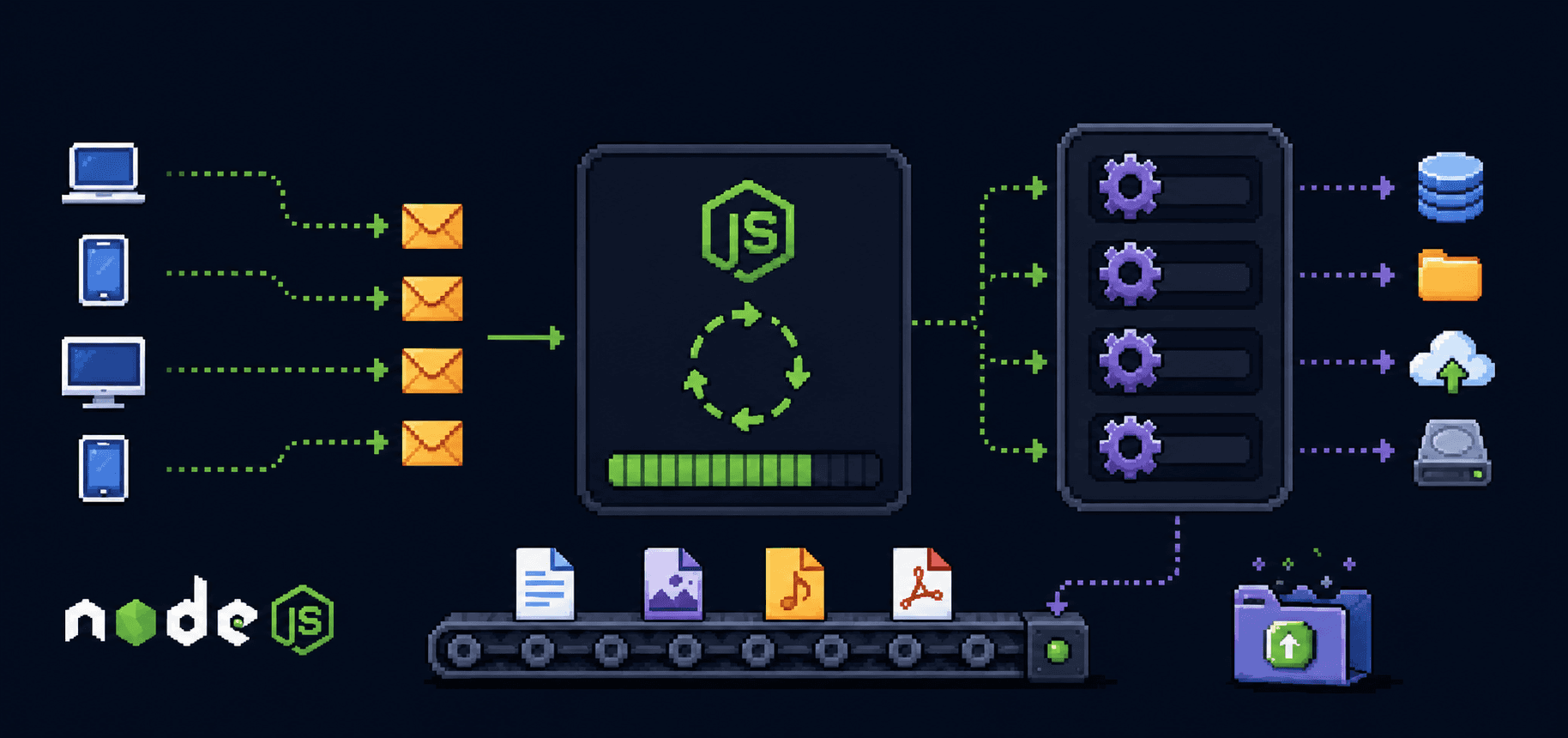
The first time someone told me Node.js is single-threaded, I thought they were messing with me. How does a server that runs on one thread handle thousands of people hitting it at the same time? That sounds like putting one cashier in a store during Black Friday and expecting everything to go fine.
I had this wrong mental model for weeks. I kept picturing a single thread like a single person doing everything, start to finish, one task at a time. That is not what happens. And once I understood what actually happens, a lot of things about Node clicked that had confused me before.
This post is about that. How Node.js works under the hood, why one thread is not as limiting as it sounds, and where it actually falls apart.
Threads and processes, without the textbook definition
A process is a running program. When you open VS Code, that is a process. When you start a Node server with node server.js, that is a process too. Each process gets its own chunk of memory from the operating system and runs independently.
A thread lives inside a process. It is a single sequence of instructions being executed. A process can have many threads running at the same time, sharing the same memory. That is how languages like Java handle multiple users: spin up a new thread for each incoming request, let them all run in parallel.
Node.js does not do that. Your JavaScript code runs on one thread. One. If you write a function that takes 3 seconds to finish, nothing else runs during those 3 seconds. No other request gets processed, no other callback fires. The whole server just sits there waiting.
That sounds terrible. But Node gets away with it, and the reason is the event loop.
The chef analogy
Think of a restaurant kitchen with one chef. This chef cannot clone themselves. There is only one.
A regular multi-threaded server is like hiring a new chef for every order. Ten orders come in, ten chefs are cooking simultaneously. Works fine until you have 10,000 orders and need 10,000 chefs and your kitchen is on fire.
Node's approach is different. The one chef takes an order, puts the pasta on the stove, and immediately moves to the next order. They do not stand at the stove watching water boil. They chop vegetables for order two, put that in the oven, then check if the pasta is done. When the oven timer goes off, they plate that dish. One chef, many dishes in progress, none of them blocking the others.
The chef is your single JavaScript thread. The stove, the oven, the timers are the operating system and the thread pool handling the slow stuff in the background. The thing connecting it all, the system that tells the chef "the pasta is ready" or "the oven timer went off," that is the event loop.
One chef, many dishes in progress:

  Order 1: pasta on stove       [waiting... ready!] --> plate it
  Order 2: veggies chopping --> oven [waiting....... ready!] --> plate it
  Order 3: salad prep --> done immediately --> plate it
  Order 4: soup heating        [waiting.... ready!] --> plate it

  The chef moves between tasks. They never just stand and wait.
What the event loop actually does
When your Node server receives a request, your JavaScript code starts running. If that code does something synchronous like math, string manipulation, or building a JSON response, it runs right there on the main thread and finishes.
But most server work is not like that. Reading a file from disk, querying a database, making an HTTP call to another API. These are I/O operations, and they are slow compared to CPU work. Disk reads take milliseconds. Network calls take tens or hundreds of milliseconds. If the main thread sat around waiting for each of these, the server would be useless.
So Node does not wait. When your code says "read this file," Node hands that job to the operating system. The OS does the actual reading on its own, separate from your JavaScript thread. Node registers a callback function, basically a note saying "when the file is done, run this function." Then it moves on immediately to handle the next thing.
The event loop is the mechanism that checks whether any of those background tasks have finished. It runs in a continuous cycle. Each cycle, it looks at a queue of completed tasks, picks up the associated callbacks, and runs them one at a time on the main thread.
const fs = require('fs');

console.log('before reading file');

fs.readFile('/some/big/file.txt', 'utf8', (err, data) => {
  // this callback runs later, when the file is done being read
  console.log('file has been read');
});

console.log('after calling readFile');
Output:
before reading file
after calling readFile
file has been read

The readFile call returns immediately. It does not block. The callback runs later, after the event loop picks it up from the completed-tasks queue. Between calling readFile and the callback firing, Node is free to handle other requests.
The background workers
"But someone has to actually read the file." Yes. Node is not doing magic. The work still happens, just not on your JavaScript thread.
Node.js is built on top of a C library called libuv. libuv maintains a thread pool, which defaults to 4 threads. When you call fs.readFile, libuv assigns the actual disk read to one of those pool threads. When that thread finishes, it places the result in a queue. The event loop picks it up on the next cycle and runs your callback.
For network I/O, it is even more efficient. libuv uses operating system features like epoll on Linux or kqueue on macOS. These let a single thread monitor thousands of network sockets without dedicating a thread to each one. That is why Node handles network-heavy workloads particularly well.
Your code (main thread)          libuv (background)
--------------------------       ---------------------------
fs.readFile('data.json')  --->   Worker thread 1: reading file
db.query('SELECT ...')    --->   OS network I/O: waiting for DB
fetch('https://api...')   --->   OS network I/O: waiting for response

  Main thread is free to         Each finishes independently
  handle new requests             and queues the result

  Event loop picks up results <--- callback queue
  and runs your callbacks

You can increase the thread pool size if your app does a lot of file system work:
// set this before any I/O happens, usually at the very top of your entry file
process.env.UV_THREADPOOL_SIZE = 8;
The default of 4 is fine for most apps. If you are doing heavy file processing or DNS lookups (which also use the pool), bumping it up can help.
Handling multiple clients
Here is a concrete example. Say your Node server gets three requests at roughly the same time. Each one queries a database, which takes about 50ms.
const express = require('express');
const app = express();

app.get('/user/:id', async (req, res) => {
  const user = await db.findUser(req.params.id);  // ~50ms, non-blocking
  res.json(user);
});

app.listen(3000);
What happens:
Request A arrives. Node starts running the handler, hits
await db.findUser(), sends the query to the database over the network, and moves on. The main thread is free.Request B arrives a few milliseconds later. Same thing. Query sent, main thread free.
Request C arrives. Same deal.
The database responds to request A's query. The event loop picks up the callback, Node runs
res.json(user)and sends the response.Request B's query finishes. Same process.
Request C's query finishes.
All three requests were "in progress" at the same time, even though only one thread ran JavaScript. The actual waiting happened elsewhere. The main thread only did the quick parts: parsing the request, building the response, sending it out.
This is concurrency without parallelism. Multiple things are in progress at the same time, but only one piece of JavaScript runs at any given instant. The parallelism happens in the background, in libuv's thread pool and the OS kernel's network handling.
Where this breaks down
The event loop works beautifully for I/O. It falls apart when you put heavy computation on the main thread.
app.get('/heavy', (req, res) => {
  // this blocks the entire server
  let sum = 0;
  for (let i = 0; i < 1_000_000_000; i++) {
    sum += i;
  }
  res.json({ sum });
});
While that loop runs, every other request to your server sits in a queue, waiting. No callbacks fire. No responses go out. The event loop cannot cycle because your code is hogging the thread. If that loop takes 2 seconds, every user experiences a 2-second delay, not just the one who hit /heavy.
This is the tradeoff. Node gives you a fast, lightweight concurrency model for I/O-bound work. In exchange, you have to keep the main thread clear of heavy computation.
When you do need CPU-intensive work, Node gives you worker_threads:
const { Worker } = require('worker_threads');

app.get('/heavy', (req, res) => {
  const worker = new Worker('./heavy-calc.js');

  worker.on('message', (result) => {
    res.json({ sum: result });
  });

  worker.on('error', (err) => {
    res.status(500).json({ error: err.message });
  });
});
// heavy-calc.js
const { parentPort } = require('worker_threads');

let sum = 0;
for (let i = 0; i < 1_000_000_000; i++) {
  sum += i;
}

parentPort.postMessage(sum);
The heavy calculation runs on a separate thread. The main thread stays free. The worker sends the result back when it is done. Your other routes keep responding normally while the calculation runs.
Why Node scales well for the right workload
Traditional multi-threaded servers allocate a thread per connection. Each thread consumes memory (typically around 1-2MB for the stack alone). Ten thousand concurrent connections means ten thousand threads and gigabytes of memory just for thread stacks, before your application code does anything.
Node uses one thread for JavaScript and lets the OS handle the waiting. A single Node process can hold tens of thousands of concurrent connections because most of those connections are just sitting in an OS-level queue, waiting for data. The memory cost per connection is tiny.
This is why Node became popular for real-time applications, chat servers, API gateways, streaming services. These are all I/O-heavy, CPU-light workloads where thousands of connections are open but most of them are idle at any given moment.
It is not the right tool for everything. Image processing, video encoding, machine learning inference, anything that pins the CPU for extended periods is a poor fit for Node's main thread. You can work around it with worker threads or by calling out to separate services, but at that point you are fighting the architecture instead of working with it.
A quick summary of the mental model
Your JavaScript runs on one thread. When it hits an I/O operation (file read, database query, network call), it hands that off to the system and keeps going. The event loop continuously checks whether any of those operations finished. When one finishes, the event loop runs the associated callback on the main thread.
The golden rule: never block the event loop. Keep the main thread doing quick work. Push slow I/O to the system. Push heavy computation to worker threads. If you follow that, one thread handles more concurrent users than you would expect.
// good: non-blocking I/O
const data = await fs.promises.readFile('data.json', 'utf8');

// bad: blocking the event loop
const data = fs.readFileSync('data.json', 'utf8');
The readFileSync version freezes your server until the file is read. The await version lets the event loop keep cycling. In a script you run once, readFileSync is fine. In a server handling requests, it is not.
References
Node.js docs: The event loop - the official explanation, worth reading after this post
Node.js docs: Worker threads - for CPU-bound work
libuv documentation - the C library underneath Node that handles the thread pool and OS-level I/O
Philip Roberts: What the heck is the event loop anyway? - the classic JSConf talk, still the best visual explanation out there
Node.js docs: Don't block the event loop - practical advice on keeping your server responsive